





Tackling Mobile H5 Soft Keyboard Challenges: Comprehensive Solutions for Layout Push-up and Failure to Recede
In mobile H5 development, layout issues caused by soft keyboard interaction are known as "high-frequency pain points". Among them, the problems of the Android-side soft keyboard popping up and lifting the page (resulting in style disorder) and the iOS WeChat environment where blank space remains on the page without falling back after the keyboard is retracted seriously affect user experience. This article will start from the problem manifestations and underlying causes, and provide a complete, practice-proven solution to help developers completely resolve such compatibility challenges.
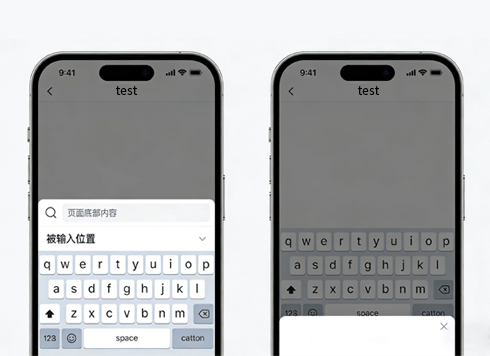
1. Problem Overview: Two Typical Anomalies Caused by Soft Keyboard
In different mobile devices and application environments, interaction anomalies between the soft keyboard and the page are mainly manifested in the following two scenarios, which require targeted analysis and handling.
1.1 Android: Page Lifted Leading to Style Disorder When Keyboard Pops Up
When users click on input boxes (input/textarea) on Android phones, the pop-up soft keyboard squeezes the page space, causing severe disorder in the originally well-laid-out page. The most common phenomenon is that elements fixed at the bottom (such as submit buttons, navigation bars) are pushed up above the keyboard, and even some content is blocked or layout is distorted. What’s more tricky is that this disorder is not temporary—even after the keyboard is retracted, part of the layout may fail to return to its original state.
1.2 iOS WeChat: Blank Space Remains Without Page Fallback After Keyboard Retraction
This problem mainly occurs in the combination of iOS 12+ and WeChat 6.7.4+ versions, and is a "classic bug" in WeChat H5 development. After users finish inputting, when they click on the blank area of the page or retract the keyboard, the soft keyboard disappears, but the area originally occupied by the keyboard leaves blank space, and the page cannot automatically fall back to the normal state. Users have to manually scroll the page to restore the normal view.
2. Root Cause Analysis: Conflict Between Layout Positioning and System Mechanisms
The essence of both types of problems lies in the conflict between the change of page viewport height and layout positioning rules when the mobile device’s soft keyboard pops up/retracts, with slightly different core incentives for different scenarios.
2.1 Android Page Lifting: "Out of Control" Positioned Elements
Most mobile H5 designs include elements fixed at the bottom (such as "Next Step" buttons), which are usually positioned with position: fixed or position: absolute. In some Android versions, when the soft keyboard pops up, it is recognized by the system as a "temporary occlusion", thereby compressing the height of the page’s visible area. At this time, the system mistakenly "unfixes" elements with fixed/absolute positioning, making them squeeze upward along with the page content, ultimately leading to layout disorder.
2.2 iOS WeChat Fallback Failure: "Abnormally Locked" Scroll Area
In the combination of iOS 12+ and WeChat 6.7.4+, the scrolling mechanism of WeChat’s built-in browser is abnormal when the soft keyboard is retracted. Under normal circumstances, the page viewport height should automatically recover after the keyboard is retracted, and the scroll area is reset synchronously. However, in this version combination, the browser fails to correctly trigger the logic of "scroll area recovery", causing the page to stay in the state when the keyboard popped up and leaving a blank area.
3. Solutions: Precise Resolution by Scenario
According to the different incentives of the two types of problems, we need to adopt a thinking that combines "listening and intervention" with "version adaptation" to achieve precise resolution. The core logic is: by monitoring page height changes or device/application versions, actively intervene in the layout state and force the restoration of the normal view.
3.1 Android: Monitor Height Changes and Force Layout Locking
The core of the solution is to "record the original viewport height, and when the keyboard pops up causing height changes, force the page container height to restore to the original height", thereby avoiding layout squeezing. The specific steps are as follows:
Step 1: Record the Original Page Height
Immediately after the page is loaded, obtain and store the initial viewport height of the page, which is the normal height when the keyboard is not popped up.
Step 2: Listen to the Page resize Event
The pop-up/retraction of the soft keyboard triggers changes in the page viewport height. By listening to the window.onresize event, obtain the current viewport height in real time. When the current height is less than the original height, it is determined that the keyboard is popped up, and the layout restoration operation is executed.
Step 3: Force Restore Container Height
Find the core content container of the page (such as the element with id "container"), and forcibly set its height to the original height to avoid being squeezed by the keyboard.
Complete Implementation Code:
// Execute after the page is loaded
window.addEventListener('load', function() {
// 1. Record the original viewport height of the page (compatible with different browser acquisition methods)
const originalHeight = document.body.clientHeight || document.documentElement.clientHeight;
// 2. Listen to viewport height changes (triggered when the keyboard pops up/retracts)
window.onresize = function() {
// Get the current viewport height
const currentHeight = document.documentElement.clientHeight || document.body.clientHeight;
// Determine that the keyboard is popped up (current height < original height)
if (currentHeight < originalHeight) {
// 3. Force the core container height to restore to the original height (replace with the actual container ID)
const container = document.getElementById("container");
if (container) {
container.style.height = ${originalHeight}px;
// Optional: Prohibit page scrolling to avoid additional disordercontainer.style.overflow = "hidden";
}
} else {
// The keyboard is retracted, restore the container's default styl
econst container = document.getElementById("container");
if (container) {
container.style.height = "auto";
container.style.overflow = "auto";
}
}
};
});
3.2 iOS WeChat: Version Adaptation and Active Trigger of Scroll Recovery
This problem is a compatibility bug of a specific version combination, so the solution needs to first "accurately identify the version", and then actively trigger page scrolling through the window.scrollTo method to force the restoration of the normal viewport state.
Step 1: Identify Device and WeChat Version
Obtain device information and WeChat version through navigator.userAgent, and filter out the target environment of "iOS 12+" and "WeChat 6.7.4+".
Step 2: Trigger Scroll Recovery When the Keyboard is Retracted
Listen to the blur event of the input box (the time when the input box loses focus, i.e., the keyboard is retracted), and call window.scrollTo(0, 0) or scroll to the maximum page height to force the browser to reset the scroll area and eliminate blank space.
Complete Implementation Code:
// Listen to the blur event of all input boxes (core timing for keyboard retraction)
document.querySelectorAll('input, textarea').forEach(el => {
el.addEventListener('blur', function() {
// 1. Identify if it is the WeChat environment
const wechatInfo = window.navigator.userAgent.match(/MicroMessenger/([\d.]+)/i);
if (!wechatInfo) return; // Non-WeChat environment, no need to handle
// 2. Extract the WeChat version and convert it to a number (e.g., 6.7.4→674)
const wechatVersion = wechatInfo[1].replace(/./g, '');
// 3. Identify if it is iOS 12+ system
const iosVersion = window.navigator.appVersion.match(/OS (\d+)(\d+)?(\d+)?/);
if (!iosVersion) return; // Non-iOS environment, no need to handle
const iosMainVersion = +iosVersion[1];
// 4. Match the target problem environment: WeChat 6.7.4+ and iOS 12+
if (+wechatVersion >= 674 && iosMainVersion >= 12) {
// 5. Actively scroll to force restore the page viewport (either method is optional as needed)
// Method 1: Scroll to the top
window.scrollTo(0, 0);
// Method 2: Scroll to the maximum page height (adapt to some special layouts)
// window.scrollTo(0, Math.max(document.body.scrollHeight, document.documentElement.scrollHeight));
}
});
});
4. Optimization and Expansion: Improve Solution Robustness
To cope with more complex development scenarios, it is necessary to supplement optimization measures on the basis of the basic solution to avoid failure caused by edge cases.
4.1 Strengthen Monitoring Combined with Focus Events
In the resize monitoring on the Android side, the focus event of the input box (the time when the keyboard pops up) can be combined to double confirm the keyboard state, avoiding misjudgment of height changes caused by other factors such as screen rotation.
4.2 Handle Dynamically Generated Input Boxes
If the input boxes in the page are dynamically generated (such as form pop-ups), they cannot be captured directly through querySelectorAll. It is necessary to use the "event delegation" method to listen to the blur event to ensure that newly generated input boxes can also trigger the fallback logic.
// Event delegation: Listen to the blur event of all input boxes in the document (including dynamically generated ones)
document.addEventListener('blur', function(e) {
const target = e.target;
if (['INPUT', 'TEXTAREA'].includes(target.tagName)) {
// Put the iOS WeChat fallback processing logic here
}
}, true);
4.3 Avoid Excessive Intervention in Layout
After forcibly setting the container height on the Android side, before page jump or unload, clear the resize listener through window.removeEventListener and restore the container’s default style (height: auto) to avoid affecting other pages.
5. Summary
The core of mobile H5 soft keyboard layout problems lies in the incompatibility between "system viewport changes" and "front-end layout rules". The key on the Android side is to "lock the original height and resist squeezing", and the key on the iOS WeChat side is to "precisely adapt to versions and actively trigger recovery". Through the scenario-specific solutions provided in this article, combined with optimization and expansion measures, the problems of soft keyboard lifting disorder and fallback failure can be completely solved, and the interactive experience of mobile H5 can be significantly improved.
In actual development, it is recommended to fine-tune the container selectors and style settings in the code according to the project’s specific layout (such as whether there are multi-layer nested containers, whether frameworks are used) to ensure that the solution is perfectly compatible with the project scenario.