





WeChat Official Account H5 Share Button Not Working? Overlay Guidance to the Rescue
I. Problem Tracing: The Boundary of Sharing Permissions in the WeChat Ecosystem
To solve the problem of unresponsive share buttons, it is first necessary to clarify the permission restrictions on sharing functions in the WeChat ecosystem. To protect user experience and platform security, WeChat has set strict specifications for SDK calling scenarios: custom share buttons inside the page cannot directly trigger WeChat's core sharing logic.
This is not a flaw in the developer's code, but the underlying design logic of WeChat—the trigger entry for the sharing function is uniformly converged in the "More" menu at the top right corner of the WeChat client. Whether it is sharing with friends, sharing to Moments, or the collection function, all must be initiated through this fixed entry. This restriction fundamentally prevents malicious induced sharing on the page, but it also brings challenges to developers in function design: users are often unaware that they need to click the operation button at the top right corner, leading to the interruption of the carefully designed sharing link.
II. Solution: Share Guide Mask to Clarify the Sharing Path
When technical means cannot break through platform permission restrictions, optimizing product design becomes the key. The core idea of the share guide mask is to inform users of the correct sharing operation path in a visual way, converting the "hidden" permission restrictions into "explicit" user guidance. It not only complies with WeChat platform rules but also effectively improves sharing conversion rates. Its implementation needs to balance design rationality and technical feasibility, which can be divided into three core steps.
1. Mask Design: Highlight Guidance, Reduce Interference
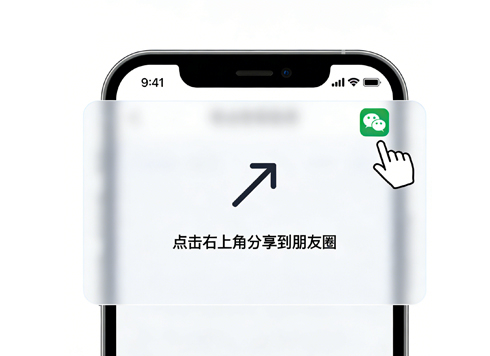
The core value of the mask is "guidance" rather than "disturbance", so the design must follow the principles of "simplicity and clarity, clear primary and secondary". First, the mask background is recommended to use semi-transparent black (rgba(0,0,0,0.7)), which can weaken the underlying page content without completely obscuring page information, avoiding users' misunderstanding of "page freeze". Second, the guide content needs to include three core elements:
- Operation guide icon: Use arrows or dynamic icons to clearly point to the "More" button at the top right corner of WeChat, forming a clear operational movement line visually;
- Concise copy: Use short sentences such as "Click the top right corner · Share to friends" to directly convey core information and avoid redundant descriptions;
- Close entry: Set an obvious "Close" button at the bottom left or bottom right of the mask to ensure users have the right to exit the guide independently and improve the friendliness of the experience.
In addition, the display timing of the mask needs to be precisely controlled. It is recommended to trigger it when the user clicks the share button in the page to achieve real-time linkage of "operation - feedback", allowing users to understand the correlation between the mask and their own operations.
2. Technical Implementation: Lightweight Adaptation, Compatible with Multiple Scenarios
The technical implementation of the mask is relatively low in difficulty, without relying on complex plug-ins. The core is to complete it through a simple combination of HTML, CSS and JS, while taking into account the adaptability of different devices. The following are the key implementation codes and precautions:
// 1. Mask HTML structure
<div class="share-mask" id="shareMask" style="display: none;">
<div class="share-guide">
<img src="guide-arrow.png" alt="Guide Arrow" class="guide-arrow">
<p class="guide-text">Click the top-right corner · Share to friends</p>
</div>
<button class="close-btn" id="closeMask">Close</button>
</div>
// 2. CSS style core configuration (adapted for mobile terminals)
.share-mask {
position: fixed;
top: 0;
left: 0;
width: 100vw;
height: 100vh;
background: rgba(0,0,0,0.7);
z-index: 9999; // Ensure the mask is on the top layer
display: flex;
flex-direction: column;
align-items: flex-end;
padding: 20px;
}
.guide-arrow {
width: 60px;
height: 60px;
margin-right: 10px;
}
.guide-text {
color: #fff;
font-size: 16px;
margin-top: 10px;
margin-right: 20px;
}
.close-btn {
position: absolute;
bottom: 40px;
left: 50%;
transform: translateX(-50%);
padding: 8px 24px;
background: #fff;
border: none;
border-radius: 20px;
font-size: 14px;
color: #333;
}
// 3. JS to control display and hide
// Click event of the share button in the page
document.getElementById("shareBtn").addEventListener("click", function() {
document.getElementById("shareMask").style.display = "flex";
});
// Click event of the close button
document.getElementById("closeMask").addEventListener("click", function() {
document.getElementById("shareMask").style.display = "none";
});
// Close by clicking the blank area of the mask (optional optimization)
document.getElementById("shareMask").addEventListener("click", function(e) {
if (e.target === this) {
this.style.display = "none";
}
});
Key precautions for technical implementation: First, the z-index value of the mask should be set large enough (e.g., 9999) to avoid being blocked by other page elements; second, fix the mask position with position: fixed to ensure that the guide information is always visible when the page is scrolled; third, be compatible with the adaptation issues of the WeChat built-in browser, and ensure the display effect on different mobile phone models through the viewport setting (<meta name="viewport" content="width=device-width, initial-scale=1.0">).
3. Scenario Optimization: On-Demand Triggering to Improve User Acceptance
The share guide mask should not be a "one-size-fits-all" solution. Its display logic needs to be optimized in combination with specific business scenarios to avoid excessive disturbance to users. For example: for users who enter the page for the first time, the mask can be displayed with a 1-2 second delay to give users time to familiarize themselves with the page; for users who have clicked the mask close button, the status can be recorded through localStorage, and the mask will not be displayed repeatedly within a short period of time; for activity promotion H5, interest prompts such as "Participate in the lottery after sharing" can be added to the mask to improve users' willingness to share.
III. Upgrade of Development Thinking: The Art of Balancing Technology and Product
The problem of unresponsive share buttons is essentially a contradiction between the boundaries of technical implementation and product requirements. When encountering such problems, many developers fall into the mindset of "must break through with technology", repeatedly debugging SDK configurations and checking the validity of signatures, but ignoring the underlying rule restrictions of the WeChat platform. In fact, excellent developers should not only understand technology but also products—when technology cannot directly meet requirements, taking the initiative to propose alternative solutions based on user experience and platform rules is the core ability to solve problems.
When the product manager puts forward the requirement that "the custom share button must take effect", developers do not need to refuse bluntly. Instead, they can use data and cases to explain: forcibly breaking through platform rules may lead to the page being blocked by WeChat, while the share guide mask solution can increase the sharing conversion rate by 15%-30% in similar projects, which is both compliant and effective. This fact-based communication is far more persuasive than a direct response of "technically impossible".
IV. Summary
The development of the sharing function for WeChat Official Account H5 has always been inseparable from the boundary restrictions of platform rules. When the share button in the page fails to call the SDK, adding a share guide mask is not only a simple "alternative solution" but also the optimal solution that balances compliance, user experience and dissemination needs. Its core logic is to make up for the limitations of technical permissions through the visual guidance of product design, allowing users to clearly perceive the operation path.
For developers, this problem also reminds us that the ultimate goal of technical development is to solve business problems, not to pursue the "perfect implementation" of technology itself. Learning to find the optimal solution through product thinking within the boundaries of technology is not only a necessary skill for developing in the WeChat ecosystem but also an important direction for career growth.